
Mobile app security 10 min read
No-Code RASP vs. SDK-Based RASP
Compare integration, runtime security, performance, signing, and long-term maintenance for Android and iOS, then use one threat model to evaluate either approach.
Key takeaway
No-code RASP can reduce provider-specific changes inside the app project. SDK-based RASP can expose app-level integration points. Neither integration model is inherently more secure: compare the controls, runtime behavior, release ownership, and evidence against the same threat model.
Open article contents
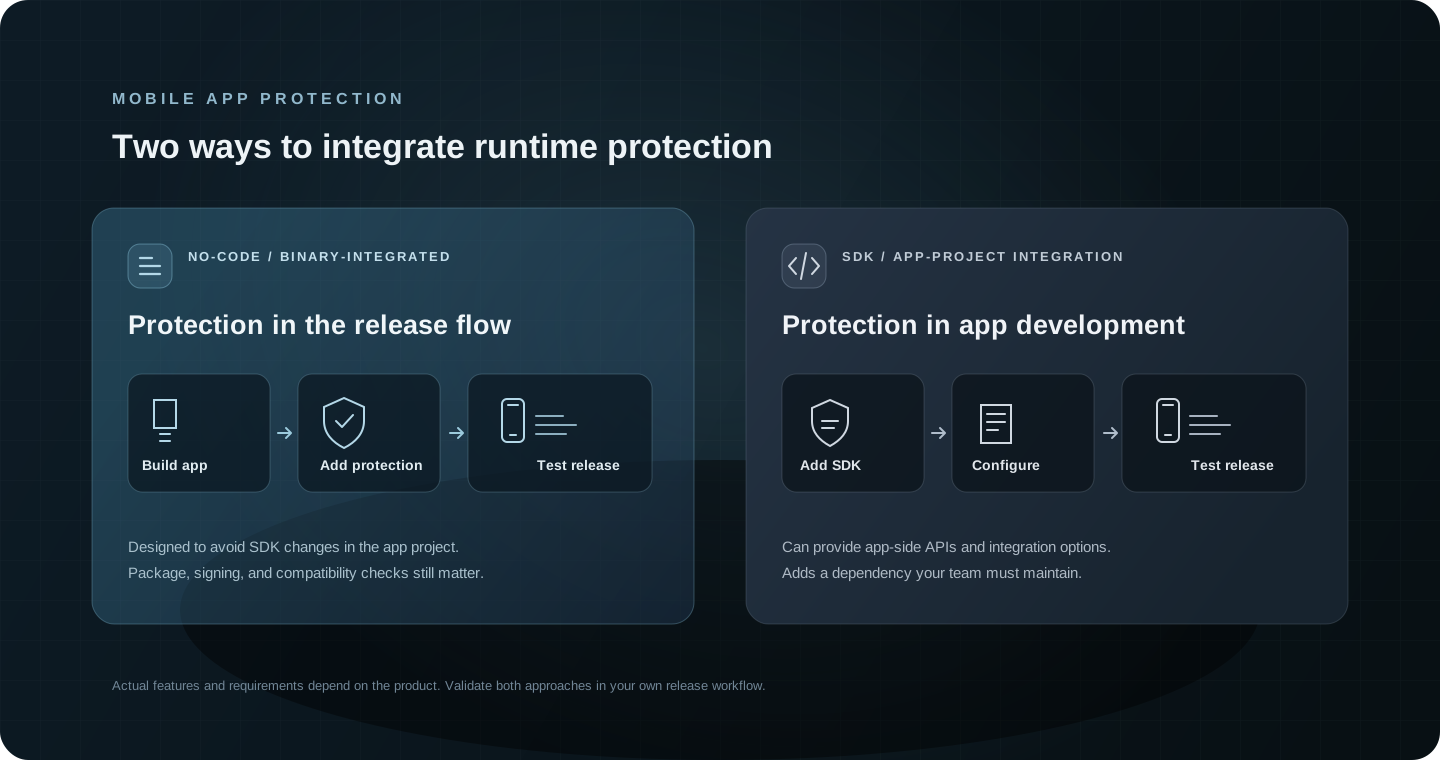
How the two models work
No-code flow
- Submit a supported package
- Configure protection
- Process and return the artifact
- Verify signing and app behavior
SDK flow
- Add the SDK to the app project
- Initialize and configure it
- Build and sign the application
- Verify runtime behavior
No-code or binary-integrated RASP
A no-code workflow is designed to add protection without asking developers to integrate a provider SDK into app source. A typical process starts with a supported package, applies selected protection settings, then returns an artifact for the team to validate and release. Some providers support pipeline automation; the specific upload, configuration, signing, and artifact steps must be confirmed.
“No-code” describes where the provider integration happens. It does not remove release engineering. Teams still need ownership for package handling, credentials, signing, artifact storage, repeatable builds, compatibility testing, and updates to the protection workflow.
SDK-based RASP
An SDK-based approach adds the provider’s libraries to the app project. Developers initialize and configure them through the application’s normal build process. Depending on the SDK, that can expose callbacks or other app-level integration points.
The app team then owns dependency versions, build configuration, SDK updates, platform and framework compatibility, and regression testing. The integration effort depends on the SDK and application architecture; “SDK-based” alone does not predict how much code is required.
Some products and architectures combine approaches. A build-time protection step can coexist with app-level controls, but teams should check for duplicated checks, conflicting responses, performance costs, and gaps in responsibility before combining layers.
Side-by-side comparison
The table compares common ownership questions. It does not rank security effectiveness: providers implement different controls, and both approaches require testing.
| Area | No-code / binary-integrated | SDK-based |
|---|---|---|
| Integration point | A provider processes a supported package or inserts a build step outside app source. | The app team adds the provider library to the application project and initializes it. |
| Source and code ownership | Often avoids provider-specific source changes; app build and release ownership still need to be clear. | The app team owns SDK configuration, code changes, dependency updates, and app rebuilds. |
| CI/CD workflow | Can add package upload, protection, artifact retrieval, and validation steps to a pipeline; automation varies by provider. | Can run inside the existing app build; dependency, configuration, and version controls become pipeline responsibilities. |
| Security effectiveness | The integration model alone does not indicate which runtime signals or responses are implemented. | SDK integration alone does not indicate which runtime signals or responses are implemented. |
| Runtime behavior | Detection signals, enforcement options, and false-positive handling depend on the product and selected configuration. | Detection signals, enforcement options, and false-positive handling depend on the SDK and selected configuration. |
| Performance impact | Measure startup, CPU, memory, battery, and app behavior on the processed build. | Measure startup, CPU, memory, battery, and app behavior with the SDK integrated. |
| Signing and integrity | Confirm where signing happens, who controls keys, and how the final package identity and integrity are verified. | The app team generally owns its build and signing pipeline; verify the final artifact and platform-specific requirements. |
| Compatibility | Check supported package formats, OS versions, app frameworks, native libraries, and store workflows. | Check SDK support for OS versions, app frameworks, native libraries, and the app build toolchain. |
| Updates and maintenance | Provider changes may enter through its processing workflow; each new output still needs release testing. | The team manages dependency updates, integration changes, rebuilds, and regression testing. |
| Telemetry and evidence | Available runtime events and build evidence vary; confirm what is recorded, retained, and exportable. | Available runtime events and build evidence vary; confirm what is recorded, retained, and exportable. |
| Total cost of ownership | Compare licensing and provider workflow with testing, release operations, support, and integration constraints. | Compare licensing with engineering, dependency maintenance, testing, release work, and support. |
On a narrow screen, scroll the comparison horizontally to read each approach in full.
Evaluate protection against your app’s threat model.
Bring your Android or iOS release constraints and test criteria to a technical conversation.
Integration model is not security effectiveness
RASP describes a family of client-side resilience measures. Depending on the implementation, products may check runtime integrity, debugging, instrumentation, or other threat signals and then log, restrict, or terminate activity. No-code and SDK-based describe delivery and integration, not a standardized list of detections, response quality, coverage, or bypass resistance.
Depending on the product and configuration, runtime controls may include root or jailbreak checks, anti-debugging, instrumentation or hooking signals, and application integrity or anti-tampering checks. Obfuscation can make reverse engineering harder. Network controls such as TLS certificate pinning may complement these measures, but they are a separate capability with their own compatibility and update requirements. No single list applies to every RASP implementation.
OWASP treats resilience measures such as obfuscation, anti-debugging, anti-tampering, and RASP as defense in depth. They can raise the cost of certain attacks, but they do not replace secure design, server-side authorization, sound cryptography, or validation of sensitive operations. Their value should be judged against the app’s threat model and tested controls.
False positives matter as much as detection claims. For each signal, ask what is observed, what action can follow, whether a legitimate user can recover, and what evidence an analyst receives. Test normal device conditions as well as the threat scenarios the control is meant to address.
For performance, request reproducible measurements on representative devices and compare protected and baseline builds under the same workload. Include cold and warm startup, CPU and memory, battery over a defined session, network activity if applicable, and latency through critical user flows. Do not rely on a single vendor score or a measurement from a different app.
See the OWASP MASVS resilience guidance for the control objectives and the OWASP Mobile Application Security Testing Guide for practical assessment methods.
Signing, compatibility, and maintenance
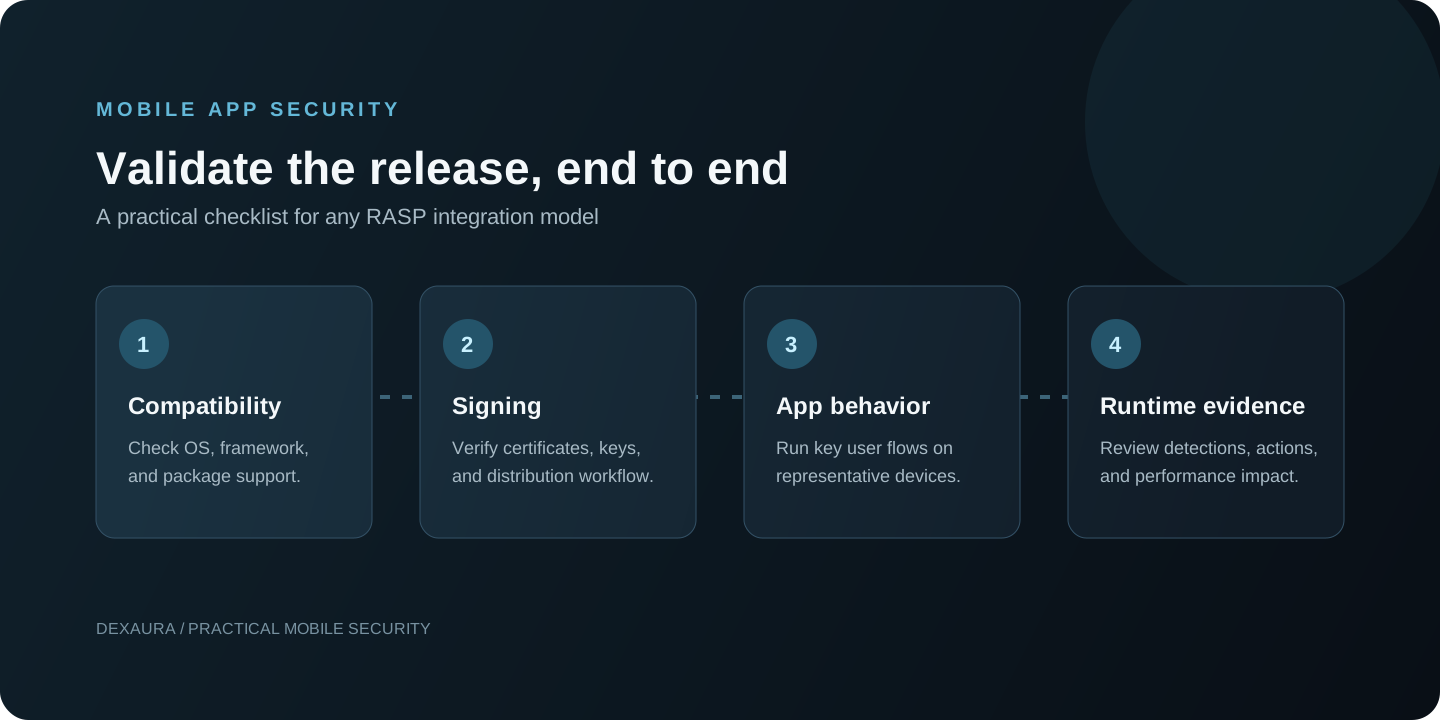
Binary processing can change the application package. Before adopting it, establish who signs the final artifact, where signing keys are held, how the output’s application identity and entitlements are preserved, and how the team verifies the package that reaches distribution. For an SDK, establish which team owns signing in the normal app build and what changes when the SDK is upgraded. The exact requirements differ across platforms and vendors, so validate the final release artifact rather than assuming one workflow.
Compatibility should be tested with the actual application stack: minimum and current OS versions, native libraries, app frameworks such as Flutter or React Native, store packaging, and any existing build or protection tools. Ask for a current support matrix and test the specific app. A broad platform label is not enough to establish compatibility.
Compare maintenance over the release lifecycle. A provider-managed processing step can reduce source-level integration, but the team still owns validation and rollout. An SDK puts dependency and integration updates in the app project, but may offer controls the app can call directly. Both paths need monitoring for OS changes, application regressions, policy changes, and security updates.
Total cost of ownership includes more than a license or the first integration. Include engineering time, CI/CD changes, signing operations, support, test coverage, performance evaluation, release coordination, and the cost of future updates. Use your team’s actual workflow to estimate it.
Example: evaluating RASP for a high-security mobile application
This is a hypothetical evaluation scenario, not a Dexaura customer case study. A team has Android and iOS applications and wants to assess anti-tampering and runtime threat detection while preserving app signing, accessibility, and critical account flows.
| Evaluation stage | No-code approach | SDK approach |
|---|---|---|
| Integration | Mobile release and AppSec teams define package intake, configuration, signing ownership, and artifact return. | Mobile developers and AppSec integrate the SDK, configure controls, manage dependencies, and rebuild each app. |
| Release checks | Validate the processed Android and iOS packages, their signing/integrity details, store flow, and app behavior. | Validate both platform builds, dependency and build configuration, signing, store flow, and app behavior. |
| Ownership | Agree which team controls configuration, keys, rollout, evidence, and vendor handoffs. | Agree which team owns SDK integration, updates, runtime policy, rollout, and incident review. |
For a fair comparison, both pilots should use the same app versions, threat scenarios, device matrix, user journeys, and pass/fail criteria. Record the protection behavior, false positives, performance, signing outcome, evidence available to responders, and engineering hours. That makes the decision about your release fit and threat model, not a label.
Use the same test plan for both approaches
- Define the threat model. Identify the assets, attacker capabilities, relevant runtime conditions, and server-side controls already in place.
- Agree on test cases. Map each desired signal to an expected response, a benign-control case, and the evidence required to verify the result.
- Use matched builds and devices. Compare the same app release, supported OS versions, device classes, and user journeys.
- Measure behavior and cost. Record false positives, performance, crash/regression rates, signing changes, implementation effort, and update steps.
- Review the release evidence. Verify the final artifact, configuration, signing details, and audit information your release and incident teams need.
RASP is inherently bypassable because the app runs on a device controlled by its user. Treat it as one layer in a broader design, protect sensitive decisions on trusted services, and test the controls rather than assuming they prevent every attack.
Where Dexaura fits
Dexaura provides a no-code protection workflow for supported Android and iOS application packages. The workflow is designed to apply configured build-time and runtime protections around a release without requiring provider-specific changes to application source code.
What to validate in a Dexaura-protected release
Use the release record as a starting point for verification. Available evidence depends on platform and build. Review:
- Artifact hashes and available build artifacts to identify the package being reviewed.
- Configuration and policy digests to confirm which settings are associated with the build.
- Signing metadata where recorded, then verify the final package signature and identity in your release process.
- Available runtime events and module health against the same threat model and test cases used for other approaches.
These records help teams review a release; they do not by themselves prove runtime detection effectiveness or performance.
For an evaluation, bring a representative app and the same test plan you would use for another provider. Confirm package and framework support, signing responsibilities, available controls, performance behavior, and the evidence your team can inspect before deciding whether the workflow fits.
Frequently asked questions
Is no-code RASP as secure as SDK-based RASP?
The integration model does not determine security effectiveness. Compare the actual controls, configurations, runtime responses, compatibility, and test evidence for each product against the same threat model.
Does no-code RASP require access to application source code?
It is intended to avoid provider-specific source changes, but the service may need a supported application package and release inputs. Confirm package access, signing, and workflow requirements with the provider.
Can RASP be bypassed?
Yes. Client-side resilience controls can raise attacker effort, but they cannot guarantee prevention on a user-controlled device. Keep sensitive authorization and business decisions on trusted services.
How can binary protection affect app signing?
Processing changes the package, so teams must establish who signs the returned artifact, how keys are handled, and how the final signature and app identity are verified. The exact workflow is provider- and platform-specific.
Can no-code RASP protect Flutter or React Native apps?
Support varies by provider, platform, package type, and framework version. Ask for the current support matrix and validate your own Android and iOS builds in a proof of concept.
Evaluate protection against your app’s threat model.
Bring your Android or iOS release constraints and test criteria to a technical conversation.
Further reading
Continue with the Android and iOS product workflow or a related analysis of runtime instrumentation.
About the author
Ahmed Hesham
Ahmed is Dexaura’s founder and an application security engineer whose work includes mobile application security, Android and iOS testing, and reverse engineering.
View Ahmed’s LinkedIn profile